


Microsoft office Practice Question and Answer
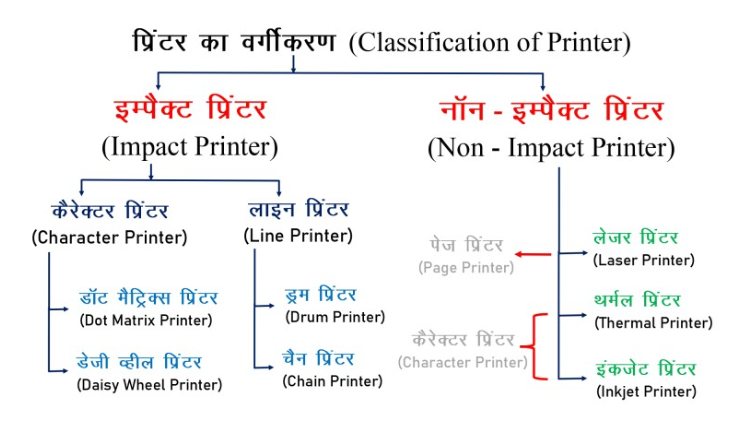
8 Q: Ink-jet printers or band printers are classified as –
2028 064ba80c7c3da05b2213eee20
64ba80c7c3da05b2213eee20- 1Character Printerstrue
- 2Ink Printersfalse
- 3Line Printersfalse
- 4Off-Band Printersfalse
- Show AnswerHide Answer
- Workspace
- SingleChoice
Answer : 1. "Character Printers"
Explanation :
Ink-jet printers or band printers are classified based on the printing method.
Q: What is the key combination to move down one paragraph in MS PowerPoint?
1988 063ac1725fb04114b2d3ba319
63ac1725fb04114b2d3ba319- 1down arrowfalse
- 2shift+down arrowfalse
- 3ctrl+down arrowtrue
- 4Alt+Down Arrowfalse
- Show AnswerHide Answer
- Workspace
- SingleChoice
Answer : 3. "ctrl+down arrow "
Explanation :
Actually, in MS PowerPoint (and most other word processing applications), the key combination to move down one paragraph is "Enter". Pressing the "Enter" key moves the cursor to the next paragraph. If you want to move the cursor down one line within the same paragraph, you can use the "Down Arrow" key. There isn't a specific default key combination to move down one paragraph in PowerPoint; it's more about using the "Enter" key to start a new paragraph.
Q: What is meant by Microsoft Office Picture Manager?
1983 164ba7dd9e2108a7239398de0
64ba7dd9e2108a7239398de0- 1Basic photo management softwaretrue
- 2An application that helps in editing scanned documents.false
- 3A scanning and OCR applicationfalse
- 4None of thesefalse
- Show AnswerHide Answer
- Workspace
- SingleChoice
Answer : 1. "Basic photo management software"
Explanation :
1. Microsoft Office Picture Manager is a raster graphics editor introduced in Microsoft Office 2003 and included until Office 2010.
2. Microsoft Office Picture Manager refers to the basic picture management software.
Q: Mail merge is a component of which of the following?
1979 063bfedd5b90600403be5c4be
63bfedd5b90600403be5c4be- 1MS Wordtrue
- 2MS Excelfalse
- 3Word Pressfalse
- 4MS Accessfalse
- Show AnswerHide Answer
- Workspace
- SingleChoice
Answer : 1. "MS Word"
Explanation :
Mail merge is a feature in Microsoft Word that allows you to create personalized documents, such as letters, envelopes, or labels, by combining a main document (containing generic content) with a data source (such as an Excel spreadsheet or a database) that contains specific information for individual recipients. This feature is commonly used for creating mass mailings or personalized communication materials.
Q: What is the difference between pressing Ctrl+X and Ctrl+C buttons in MS Word 2010?
1863 064a5654f8ecb104cc6265dbd
64a5654f8ecb104cc6265dbd- 1Ctrl+x is used to paste the text and Ctrl+c is used to copy the text.false
- 2Ctrl+x is used to cut the text and Ctrl+c is used to copy the text.true
- 3Ctrl+x is used to copy the text and Ctrl+c is used to cut the text.false
- 4Ctrl+x is used to select text and Ctrl+c is used to copy text.false
- Show AnswerHide Answer
- Workspace
- SingleChoice
Answer : 2. "Ctrl+x is used to cut the text and Ctrl+c is used to copy the text."
Explanation :
Ctrl+x is used to cut the text and Ctrl+c is used to copy the text.
Q: The number of rows in Excel 2003 is ______.
1813 063ecd224e6cd351b75fdc8a1
63ecd224e6cd351b75fdc8a1- 165535false
- 265536true
- 365534false
- 465533false
- Show AnswerHide Answer
- Workspace
- SingleChoice
Answer : 2. "65536"
Explanation :
In Excel 2003, the number of rows is 65,536. Each worksheet in Excel 2003 consists of 65,536 rows and 256 columns.
Q: The horizontal lines displayed in the plot area of a chart in MS Excel 2010 are called.
1795 064941e591a612ce001e32bd9
64941e591a612ce001e32bd9- 1Chart titlefalse
- 2data pointfalse
- 3Legendfalse
- 4Gridlinetrue
- Show AnswerHide Answer
- Workspace
- SingleChoice
Answer : 4. "Gridline"
Explanation :
1. The horizontal lines displayed in the plot area of a chart in MS Excel 2010 are called gridlines.
2. Types of Grid Lines in MS Excel 2010 –
- Main grid lines: These show the key values of the data ranges. They have usually displayed every 5 or 10 values.
Secondary grid lines: These show the intervals between data ranges. They usually appear after every 1 or 2 values.
Q: By using which tab can you add page numbers in an MS-Word 2019 document?
1761 163ac0ff5fb04114b2d3b656e
63ac0ff5fb04114b2d3b656e- 1editfalse
- 2formatfalse
- 3inserttrue
- 4Homefalse
- Show AnswerHide Answer
- Workspace
- SingleChoice
Answer : 3. "insert "
Explanation :
In Microsoft Word 2019, you can add page numbers to your document by using the "Insert" tab. The "Insert" tab contains various options, including the "Page Number" option, which allows you to insert page numbers at different locations in your document.