


Computer GK Practice Question and Answer
8 Q: Register is a high-speed memory element, which is located in -
2179 063e4d9730cf671793fcf3638
63e4d9730cf671793fcf3638- 1in memory offalse
- 2CPUfalse
- 3input/output unitfalse
- 4in ROM or EPROMtrue
- Show AnswerHide Answer
- Workspace
- SingleChoice
Answer : 4. "in ROM or EPROM"
Q: Ellipse Motion is a predefined ________
2047 063e606f3124b1363b8efe2cf
63e606f3124b1363b8efe2cf- 1design templatefalse
- 2color schemefalse
- 3animation schemetrue
- 4none of the abovefalse
- Show AnswerHide Answer
- Workspace
- SingleChoice
Answer : 3. "animation scheme"
Q: 3 A nibble is equal to bits.
2021 06177ed695456305c55a7fd75
6177ed695456305c55a7fd75- 14true
- 28false
- 316false
- 432false
- Show AnswerHide Answer
- Workspace
- SingleChoice
Answer : 1. " 4"
Explanation :
Actually, a nibble consists of 4 bits, not 3. In computing, a nibble is a unit of data that consists of 4 bits, which can represent 16 different values (2^4). Each nibble can be expressed as a single hexadecimal digit (0 to F, where F represents 15 in decimal) and is half of a byte, which consists of 8 bits. So, 4 bits make up one nibble.
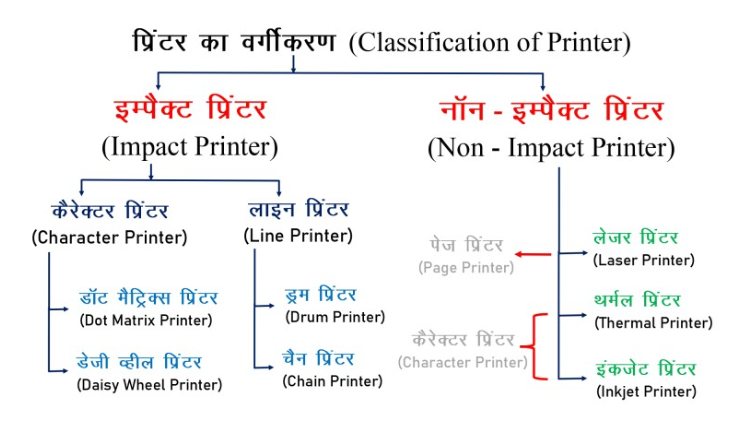
Q: Ink-jet printers or band printers are classified as –
1990 064ba80c7c3da05b2213eee20
64ba80c7c3da05b2213eee20- 1Character Printerstrue
- 2Ink Printersfalse
- 3Line Printersfalse
- 4Off-Band Printersfalse
- Show AnswerHide Answer
- Workspace
- SingleChoice
Answer : 1. "Character Printers"
Explanation :
Ink-jet printers or band printers are classified based on the printing method.
Q: Laser printer resolution is specified in terms of:
1976 063ac24c4e541fa7a012fc490
63ac24c4e541fa7a012fc490- 1DPItrue
- 2LPMfalse
- 3CPMfalse
- 4LSIfalse
- Show AnswerHide Answer
- Workspace
- SingleChoice
Answer : 1. "DPI "
Explanation :
Laser printer resolution is specified in terms of DPI, which stands for Dots Per Inch. DPI refers to the number of dots a printer can place within one square inch of space on a printed page. Higher DPI values generally result in sharper and more detailed printouts. Laser printers typically offer higher DPI resolutions, such as 600 DPI or 1200 DPI, leading to high-quality text and graphics output.
Q: What is meant by Microsoft Office Picture Manager?
1954 164ba7dd9e2108a7239398de0
64ba7dd9e2108a7239398de0- 1Basic photo management softwaretrue
- 2An application that helps in editing scanned documents.false
- 3A scanning and OCR applicationfalse
- 4None of thesefalse
- Show AnswerHide Answer
- Workspace
- SingleChoice
Answer : 1. "Basic photo management software"
Explanation :
1. Microsoft Office Picture Manager is a raster graphics editor introduced in Microsoft Office 2003 and included until Office 2010.
2. Microsoft Office Picture Manager refers to the basic picture management software.
Q: What is the key combination to move down one paragraph in MS PowerPoint?
1941 063ac1725fb04114b2d3ba319
63ac1725fb04114b2d3ba319- 1down arrowfalse
- 2shift+down arrowfalse
- 3ctrl+down arrowtrue
- 4Alt+Down Arrowfalse
- Show AnswerHide Answer
- Workspace
- SingleChoice
Answer : 3. "ctrl+down arrow "
Explanation :
Actually, in MS PowerPoint (and most other word processing applications), the key combination to move down one paragraph is "Enter". Pressing the "Enter" key moves the cursor to the next paragraph. If you want to move the cursor down one line within the same paragraph, you can use the "Down Arrow" key. There isn't a specific default key combination to move down one paragraph in PowerPoint; it's more about using the "Enter" key to start a new paragraph.
Q: ________ is an output device that is used for TV Like displays the output on the screen and it is also called visual display unit.
1940 063ecbec335d86258ec99c013
63ecbec335d86258ec99c013- 1Printerfalse
- 2monitortrue
- 3Plotterfalse
- 4Projectorfalse
- Show AnswerHide Answer
- Workspace
- SingleChoice
Answer : 2. "monitor"
Explanation :
An output device that is used for TV-like displays and shows the output on the screen is indeed called a monitor. It is also commonly referred to as a visual display unit (VDU). Monitors and VDUs are used to display visual information from computers and other electronic devices, allowing users to view text, images, videos, and other graphical content. They come in various types, including CRT (Cathode Ray Tube), LCD (Liquid Crystal Display), LED (Light Emitting Diode), and OLED (Organic Light Emitting Diode) monitors.